How to successfully run your LiveScope 2
Learn to use LiveScope 2 settings for better fishing and a clearer view of life below the surface.
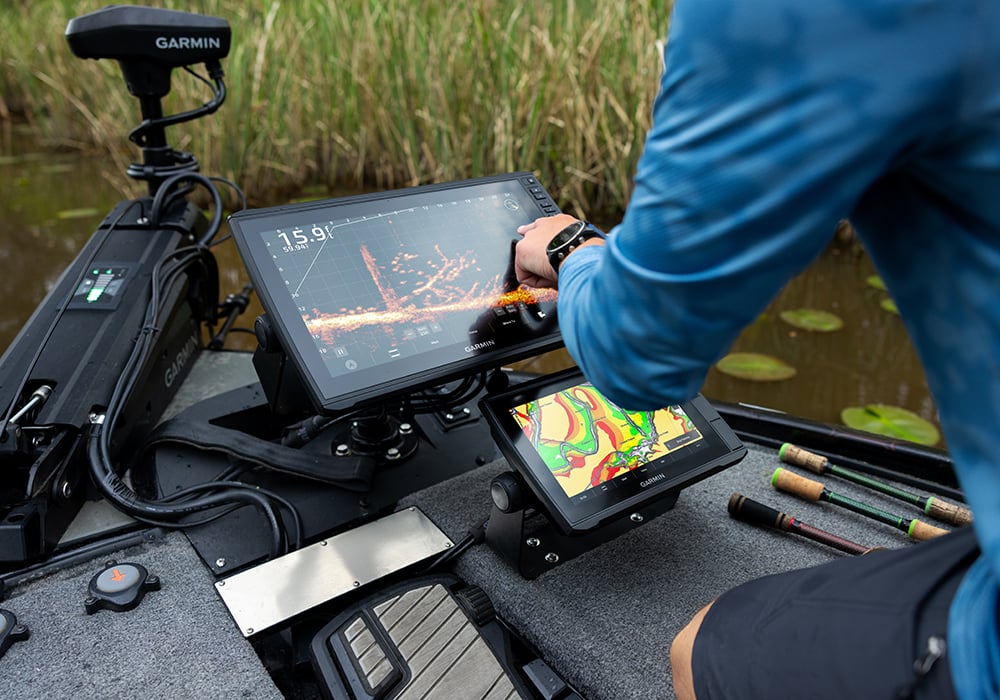
LiveScope™ 2 is an avid anglers dream. With improved resolution, LiveScope 2 users get visually captivating and realistic underwater views. Fish, lure, brush piles and anything else under the surface is suddenly clearer than ever.
If you’ve decided to upgrade your boat with this improved marine electronic, spending a couple hours on the water is a good way to get familiar with setting adjustments. To dial in on the fish below, take time and learn how each setting impacts the image on your screen.
But before you head out, read on as we reveal tips and tricks for running LiveScope 2 on your boat.
What’s new with the LiveScope 2 series?
Let’s first break down everything you’re getting.
With LiveScope 2 LVS44 onboard, you’ll receive 20% higher resolution and 25% more range, meaning you can track out to 250′ in forward and down modes. From your chartplotter, pick fish off the bottom as well as ones that are tight to cover. Thanks to improved visibility, anglers can adjust their strategy in real time and strike with confidence when the opportunity arises.
Anglers who care about detailed imagery within a shorter range will appreciate LiveScope 2 HD LVS42HD. For clearer imagery and better target separation, LiveScope 2 HD offers 50% more detail near the boat. Plus, track castable distances out to 125′ in forward and down modes.
Simplifying installation without sacrificing sonar performance, LiveScope 2 models eliminate the need for a black box, meaning your transducer delivers sonar data straight to your compatible chartplotter. When it’s time to move spots, simply lift the transducer out of the water and your sonar will automatically turn off.
How does cone angle compare on LiveScope 2?
Anglers with LiveScope Plus systems are familiar with its 20-degree cone angle, giving them an optimised field of view for enhanced target detail. LiveScope 2 has the same 20-degree cone angle, but improved sensitivity and resolution across the sonar beam allows the image on your screen to remain crisper and more uniform. This means that targets on the edge of the sonar beam may appear more consistently on the screen with certain sonar settings.
Anglers can fine-tune their image to change the perceived cone angle using colour gain and colour limit settings (read on for our suggestion). Improved functionality means you can dial in your sonar to fit your preferred fishing methods, whether you’re looking for targets right down the middle of the sonar beam or searching for fish on the edges.
How do I use colour gain and colour limit on LiveScope 2?
LiveScope 2 gives anglers more control over the image on their screen through colour gain and colour limit settings. To unlock the power of colour gain and colour limit, users can tune their image settings for increased precision, improved detail and better lure tracking.
Using colour gain, LiveScope 2 users will have more control over the clutter in their sonar image. Depending on your preference, adjust your settings to remove clutter while keeping track of small fish and bait. Anglers using LiveScope 2 can adjust colour limit to run between 30% and 90% to remove clutter while still seeing the important things. The higher the colour limit, the more clutter is hidden.
Objects on the sides of the cone naturally appear weaker on your display, but you can adjust your colour gain or colour limit settings for utmost clarity. For hotter returns, simply increase colour gain settings. To hide weaker returns, reduce your gain or increase your colour limit. This is also what makes your cone angle feel narrower for ultimate precision.
What’s different about ghost and noise reject settings?
Finding the ideal ghost and noise reject settings reduces lag and clears any unnecessary returns on your LiveScope system, allowing you to see and react to fish immediately.
Set ghost reject to auto for system-controlled adjustments and to reduce false sonar returns. Instead of relying on filters, sonar power is distributed across the sonar beam to decrease false echoes, including ghost trees, while still allowing for target tracking.
To improve lure tracking, reduce your noise reject setting to low or off. You won’t miss your bait or the fish you’re keen on catching.
What colours should I try out?
With various colours to choose from, you’re sure to find colour palettes that make sense for you. Depending on the lighting conditions, certain colours can help anglers see their screen clearly and reduce eye strain.
On LiveScope Plus, popular colour schemes include amber, blue and black emerald.
LiveScope 2 users may prefer moss and lava. Moss, a single-colour option, is easy on your eyes and lends itself to excellent target separation. Lava, a popular high-contrast option, makes underwater life pop, even in murky waters.
Days of successful fishing lie ahead with LiveScope 2. Browse our live sonar offerings and find a system that’s right for your boat.